CSS Specificity
Understand the rules that determine which style declarations are applied to an element.
What is CSS Specificity?
CSS Specificity is the algorithm used by browsers to determine which CSS rule is the most relevant and should be applied to an element. When multiple rules target the same element and conflict, specificity decides which one wins.
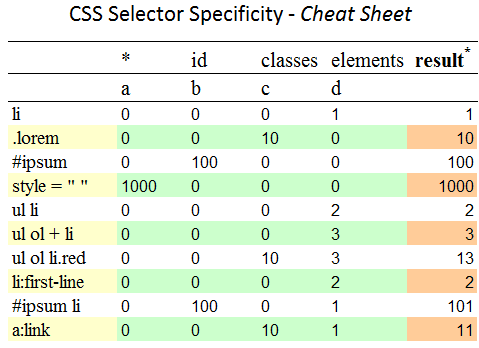
- Specificity is calculated based on the makeup of a selector.
- The selector with the highest specificity value will override others.
- If specificity is equal, the last declared rule in the CSS source order wins.
Specificity Hierarchy
Specificity is calculated by counting the number of selectors in each of these categories (from highest to lowest priority):
-
Inline Styles: Style applied directly to an element
(e.g.,
<p style="color: red;">). -
IDs: Selectors that target an element by its unique
ID (e.g.,
#my-id). -
Classes, Attributes, and Pseudo-classes: Selectors
like
.my-class,[type="text"], or:hover. -
Elements and Pseudo-elements: Selectors for element
types like
p,div, or pseudo-elements like::before.
The universal selector (*) and combinators
(+, >, ~, ' ') have no effect
on specificity.
Example 1: ID vs. Class vs. Element
/* Element selector (low specificity) */
p {
  color: blue;
}
/* Class selector (medium specificity) */
.text-green {
  color: green;
}
/* ID selector (high specificity) */
#text-red {
  color: red;
}
This text is red because the ID selector (#text-red) has the highest specificity.
Example 2: Specificity Calculation
A selector's specificity is often represented as `(IDs, Classes, Elements)`.
/* Specificity: (0, 1, 1) */
div.box {
  background-color: lightblue;
}
/* Specificity: (0, 2, 0) */
.box.dark {
  background-color: navy;
  color: white;
}
/* Specificity: (1, 0, 0) */
#unique-box {
  border: 2px solid red;
}The !important Rule
The !important declaration can be added to a style to
override all other rules, regardless of specificity. It should be used
sparingly as it can make debugging difficult.
- Use Case: Overriding styles from a third-party library or for utility classes that must always apply.
-
Warning: Avoid using
!importantin your primary stylesheet whenever possible. It's a sign of specificity wars.
Example 3: The Power of !important
#important-demo {
  background-color: red; /* High specificity */
}
.important-override {
  background-color: limegreen !important; /* Wins! */
}!important overrides the ID
selector.